Someone has read your page. They understand the offer. They are close. And then they do not click, because a small doubt surfaced and the page never addressed it. Landing page objections are predictable: there are four of them, and each has a place on the page where it belongs.
Research on why people abandon online purchases shows how often those doubts win. The Baymard Institute puts the average documented cart abandonment rate at about 70%. Its list of reasons is about checkout rather than landing pages, but the top ones map closely onto the four objections below: extra costs nobody expected (39%), not trusting the site with card details (19%), being forced to create an account (19%), and a checkout that felt too long or complicated (18%).
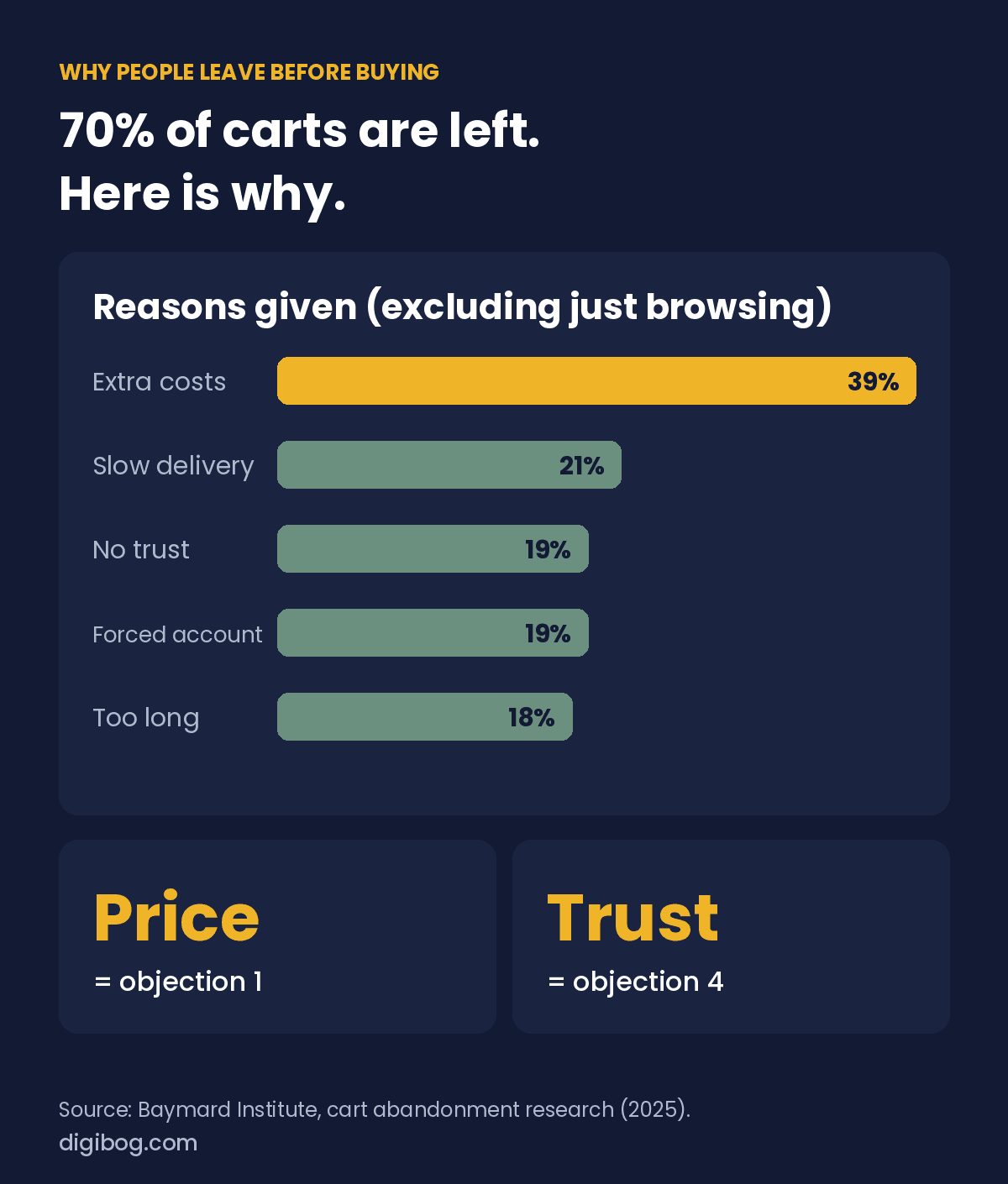
Slow delivery (21%) is the one reason on that list a digital product can remove completely. If your file arrives instantly, say so on the page. Most of the rest are not original. They are versions of four doubts, and pages that convert answer each one at the moment it forms, before the reader has to ask.
Landing page objections 1: it costs too much
Usually not about the number. It is about the number relative to a value the reader cannot see yet. It is also the biggest single reason in the research: 39% of people who abandoned a purchase did so because of costs they had not expected.
Arguing about price rarely works. Changing what the price is compared against does. Set it beside the cost of the problem continuing, or beside the obvious alternative, and the same figure reads differently.
Show the price early, and show the full price. Hiding it, or adding something at the last step, makes people assume worse.
2. It will not work for someone like me
The most common silent objection, and the hardest to spot, because the reader never says it out loud. They just quietly decide the page is describing someone else.
The fix is specificity. A testimonial from someone in their situation does more than three paragraphs of general reassurance. So does naming the situation directly: if you are running this alone with no design help, this is written for you.
3. I do not have time for this
Behind this is a fear of a project, not a purchase. People are not avoiding the cost, they are avoiding the calendar. The checkout reasons in the research are smaller versions of the same fear: an account they are forced to create, a process that feels too long. Every extra step reads as more effort.
Answer it with scope. How long does the first useful step take? What does the first fifteen minutes look like? Anything that shrinks the perceived commitment moves people more than another benefit.
4. I am not sure I trust you
Rarely stated, always present, and the one most pages handle worst, usually by adding logos. In the research, 19% of people abandoned simply because they did not trust the site with their card details.
Trust comes from specifics and from admitting limits. A page that says who this is not for reads as more honest than one that claims to fit everyone. So does a concrete number instead of a vague superlative, and a real name instead of “a client.”
What they are actually thinking
Visitors rarely state an objection. They feel a vague reluctance and close the tab, and if you ask them later they will say they were “just browsing”. The four objections are what that reluctance is made of.
| Objection | The unspoken version | What actually answers it |
|---|---|---|
| It costs too much | “I cannot tell if this is worth it, so any price feels like a risk.” | A comparison to a cost they already accept. Not a discount. |
| It will not work for me | “Your examples are all bigger, smaller or different from my situation.” | A named example that resembles them, including the awkward details. |
| I have no time | “I have bought things like this before and never opened them.” | A concrete first-week picture. What they do on day one, in minutes. |
| I am not sure I trust you | “I have never heard of you and this page could be anyone.” | Specifics only a real operation would publish. A refund policy that costs you something. |
Notice what is absent from the third column: enthusiasm. You cannot answer an objection by insisting harder. Each one is answered by supplying a piece of information the reader is missing.
Where each answer belongs
Answer each objection where it naturally arises, not only in a block at the bottom of the page. Timing matters as much as wording. Raise a doubt before the reader is interested and you plant it. Answer it after they have left and it is worthless. The right moment is just after interest forms, which gives this order:
| Page section | Objection to answer here | Why here |
|---|---|---|
| First screen | None | Its only job is to say what this is and who it is for. Adding reassurance early creates doubt. |
| After the benefits | It will not work for me | They are interested but comparing themselves to your example. Give them one they recognise. |
| Just before the price | I have no time | Effort is the second currency. Address it before you ask for the first one. |
| At the price | It costs too much | The moment it becomes real. A comparison here does more than a discount. |
| Beside the button | I am not sure I trust you | The last hesitation. Guarantee, refund terms, or what happens after they click. |
That last row is the cheapest change on this list. A single line under the button telling the reader exactly what happens next, such as an instant download and a clear refund policy, removes the fear of an unknown commitment. The wording of the button itself is covered in how to write a call to action that people actually click.
An objection answered at the moment it forms barely reads as handling an objection. It reads as the page understanding you.
Answer the four objections in your own words
The Landing Page Persuasion Workbook is a 9-page fillable PDF with 15 exercises that turn the theory in this article into copy for your page — including where each objection gets answered.
See the exercisesInstant download · unlimited downloads · no expiry · one payment, no subscriptionFinding the one that costs you most
The four above are near-universal, but the one hurting your page is usually more specific, and most businesses discover they have spent their page defending against the wrong one. Three ways to find it, in order of how little they cost:
- Read your refund and pre-sale emails. The questions people ask before buying are the objections everyone else had and did not ask. Free, and already in your inbox.
- Ask people directly. Ask three people who did not buy why not, and listen for which of the four they name. Ask the people who did buy what nearly stopped them. Their answers are rarely the ones you expect.
- Add one line answering a suspected objection and watch what happens. One change at a time, or you learn nothing.
If none of that is available yet, start with the objection you find most uncomfortable to write about. That discomfort is a reliable signal, and it is usually price.
What not to do on a landing page
Most of the things you should not do on a landing page are the same thing in disguise: they create an objection and then leave it unanswered. The checkout research above points the same way, with surprise costs and low trust near the top of the list.
| Don’t | The objection it creates | Do instead |
|---|---|---|
| Hide the price until checkout | It costs too much | Show the price early, next to what it saves |
| Use stock photos and vague claims | I am not sure I trust you | Show the real product and real details |
| Talk only about features | It will not work for someone like me | Name who it is for, and who it is not for |
| Bury how long it takes | I do not have time for this | State the time or effort up front |
| Write a clever headline | What is this? | Write a headline that earns the next line |
Frequently asked questions
Does answering objections make people think of problems they had not considered?
Only if you raise them at the wrong moment. Placed after interest has been established, an answered objection reads as confidence. Placed in the first screen, it reads as a warning. Position is what separates the two.
Should I put the price on the landing page?
Yes in almost every case. Hiding it does not remove the objection, it just moves it to a point where you can no longer answer it. The exception is genuinely custom work where a number would be meaningless without scope.
What if my product really is expensive?
Then price is not the objection. Value clarity is. Anchor against the cost of the problem continuing, or against something the reader already pays for without complaint. A discount on an unclear offer just makes it a cheaper unclear offer.
How many testimonials do I need?
Fewer than you think, and more specific than you have. One detailed account from someone the reader recognises as similar to themselves outperforms a wall of short five-star quotes with no context.
Can a FAQ section handle all of these?
It can catch the leftovers, and it is a reasonable place for the fifth and sixth objections. The main four should be answered in the flow of the page, at the moment they arise. An objection that only gets answered in a FAQ has already cost you the readers who never scrolled that far.
Try this
Write your four objections down as sentences a real person would say. Then find where each is answered on your page. The ones you cannot locate are the ones costing you conversions right now.
The Landing Page Persuasion guide covers objection handling and trust-building as a repeatable method, and the book goes deeper into the psychology underneath each one.
All six pieces — book, workbook, guide, prompts, toolstack and checklist — come together in the Landing Page Persuasion Complete Bundle.
Related reading: Why Your Landing Page Gets Traffic But No Conversions.
About the author. Written by Said Sihame, founder of DigiBog. I make the planners, workbooks and checklists sold on this site, and these articles come out of the same work. Everything here is what I use and test myself — take what fits and leave the rest.