Most people meet their token bill the same way: it was fine for months, then it was not, and nothing obviously changed. Usually nothing did change except volume, and a prompt that costs slightly too much is invisible until you multiply it by a hundred thousand.
The good news is that the fixes are structural rather than clever. You do not need to become an engineer. You need to know where the money goes.
One framing helps before you start. A prompt is not billed like software, where you build it once and running it is nearly free. It is billed like a phone call you make every time someone uses the feature. A line you would never think twice about writing is a line you are buying again on every request, forever. That changes which edits are worth making.
Where your LLM token cost actually goes
Two numbers, priced differently.
Input tokens are everything you send: system prompt, examples, retrieved documents, conversation history, the user’s question. Output tokens are what comes back. Output is the expensive side: on Anthropic’s published price list, an output token costs five times as much as an input token on every current model, and other providers price it at a similar multiple.
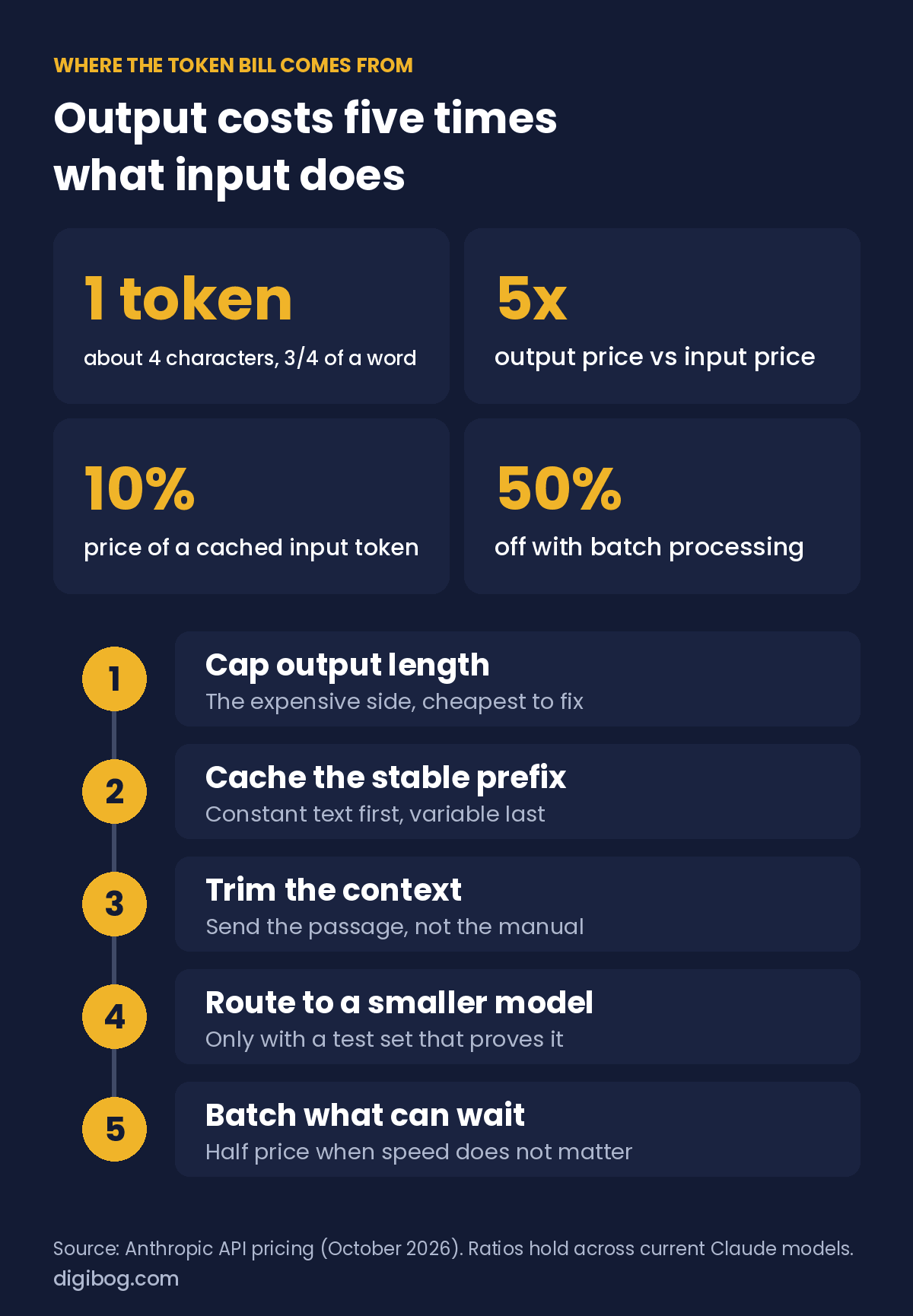
That asymmetry drives almost every decision below. A prompt that is 3,000 tokens long and returns 40 tokens is usually cheaper than a 400-token prompt that returns 800, and people consistently guess the opposite because the long prompt is the part they can see.
Two other things surprise people:
- Conversation history is re-sent every turn. A twenty-turn chat sends turn one twenty times. Cost grows with the square of the conversation, not linearly.
- Retrieved context is billed per call. Attaching a document to every request means buying that document again on every request.
The five levers
| Lever | Typical saving | Effort | Risk |
|---|---|---|---|
| Cap output length | High on chatty prompts | Minutes | Low. Truncated answers if you cap too hard. |
| Prompt caching | Cached input billed at about 10% of the normal rate | An hour to restructure | Low, once the prefix is genuinely stable. |
| Trim context | Proportional to what you cut | Depends on your retrieval | Medium. Cut the wrong passage and quality drops. |
| Model routing | Large, task-dependent | A day, plus evaluation | Medium-high. Needs a test set to prove it. |
| Batch processing | 50% at Anthropic; similar elsewhere | Depends on your pipeline | Low, if latency does not matter. |
Work down this list in order. The first two are cheap to do and hard to get wrong. Model routing is where people start, and it is the one most likely to quietly degrade quality.
Output length is the cheapest win
Start here, always. Output is the expensive side, and most prompts return far more than anyone reads.
Three changes, in order of impact:
// 1. Cap it explicitly
Max 2 sentences. No preamble, no restatement of the question.

// 2. Replace prose with fields
Return exactly:
  verdict: approve | reject
  reason:  one sentence, max 15 words

// 3. Ban the padding
Do not explain what you are about to do.
Do not summarise what you just did.
Do not offer follow-up suggestions.
That third block reads like nitpicking and is not. “Certainly! Here’s a breakdown of…” followed by a closing “Let me know if you’d like me to expand on any of these!” is fifty tokens of nothing on every single call. The same instinct is why writing out reasoning nobody reads is expensive, which is the subject of why “think step by step” is costing you money.
Caching, and how to earn it
Prompt caching lets a provider recognise that the beginning of your prompt is identical to one it has seen recently and charge a reduced rate for that portion. Anthropic bills a cached input token at 10% of the normal price, a saving of around 90% on that portion, which makes it the highest-leverage change most people can make.
The catch is that caching works on the prefix. It matches from the first token forward and stops at the first difference. One variable character near the top invalidates everything after it.
// Cache-friendly: stable first, variable last
system: <long stable instructions>      # cacheable
system: <fixed few-shot examples>        # cacheable
system: <reference policy document>      # cacheable
user:   <the one thing that changes>     # not cacheable

// Cache-hostile: one timestamp ruins the whole prefix
system: "Today is 2026-08-06 17:42:11. <long stable instructions>"
The second version caches nothing. Not the instructions, not the examples, not the document, because the very first line differs on every call.
The rule that follows: put everything constant at the top, in a fixed order, and everything variable at the bottom. If you need the date, put it in the user turn. This is the same structural discipline described in system prompt vs user prompt, and cost is the second reason to get it right.
More context is not better answers
A large context window invites you to paste everything. It costs you three ways at once: you pay for every irrelevant page on every call, the relevant passage competes with material that does not answer the question, and contradictory versions can be merged into an answer matching neither.
The same applies to examples. Every few-shot example rides along on every request, so an eight-example prompt is paying for five examples that stopped helping around number three, as covered in how many examples a prompt actually needs.
[dgb_offer product=”1045″ title=”Token cost is one decision. A reliable prompt needs about eleven.” text=”The AI Prompt Engineering Guide is an 11-page reference plus a 14-page fillable workbook: scope, examples, output format, and what to change first when a prompt starts drifting.” cta=”See what is inside”]
A worked example
A support classifier. One thousand requests a day. Nothing exotic.
| Before | After | |
|---|---|---|
| System prompt | 900 tokens, timestamp at the top | 900 tokens, timestamp moved to user turn |
| Examples | 8 pairs, 480 tokens | 3 pairs, 180 tokens |
| Retrieved context | Whole policy doc, 2,200 tokens | Two relevant sections, 400 tokens |
| Input per call | ~3,700 tokens, none cached | ~1,600 tokens, ~1,100 cached |
| Output per call | ~280 tokens of prose | ~30 tokens of fields |
| Relative cost | Baseline | Roughly a seventh |
Nothing here required a cheaper model. Four structural changes: move the timestamp, cut five examples, retrieve properly instead of pasting, and return fields instead of paragraphs. The arithmetic, at a 5x output price and a 10% cached rate: before, about 3,700 input tokens plus 280 output tokens (worth about 1,400 input tokens) per call; after, about 500 uncached input tokens, 1,100 cached ones (worth about 110) and 30 output tokens (worth about 150). That is roughly 15% of the original bill. Combined savings in the 50–90% range are realistic for prompts that have never been looked at, which describes most prompts in production.
Where the waste usually is
Four patterns account for most of the surprise on a bill. Check yours against these before optimising anything clever.
| Pattern | How to spot it | Fix |
|---|---|---|
| The growing conversation | A chat feature with no history limit. Cost per message climbs through a session. | Keep the last N turns plus a running summary. Drop the middle. |
| The pasted manual | The same long document attached to every call, regardless of the question. | Retrieve the relevant sections. Even crude keyword matching beats sending everything. |
| The chatty assistant | Answers open with a restatement of the question and close with an offer to help further. | Cap the length and ban preamble explicitly. |
| The retry loop | Output fails validation, code retries, nobody logs how often. | Count retries. A 30% retry rate means you are paying 1.3 times for every result. |
The retry loop is the sneakiest, because it looks like reliability engineering. If 30% of your calls run twice, fixing the prompt so the first attempt validates is a 23% saving that also makes the product faster.
What not to optimise
Three things people cut first that they should usually leave alone.
The rules. Instructions, constraints and edge-case handling are the cheapest tokens in the prompt because they are constant and cacheable. Trimming a 900-token system prompt to 600 saves almost nothing once caching is in place and reliably costs you behaviour you wanted.
The output schema. Naming fields and their allowed values looks verbose. It is what makes the answer short, because a specified output has no room to ramble. Cutting the schema to save input tokens usually increases output tokens by more.
The last useful example. Going from three examples to one saves 120 tokens and can cost you a class of correct answers. Cut examples four through eight; leave the ones doing work.
The general rule: cut what repeats without teaching, not what teaches. Padding, redundant examples, unretrieved documents and conversational filler are repetition. Rules and formats are instruction, and they pay for themselves in shorter output.
It is also worth checking the obvious before restructuring anything: whether the task needs a model call at all. A surprising share of production prompts are doing something a regular expression, a lookup table or a database query would do faster, cheaper and deterministically. The cheapest token is the one you never send.
What to monitor
You do not need a dashboard. You need four numbers, checked monthly.
- Average input and output tokens per call. Track them separately. A rising output average usually means the model started padding.
- Cache hit rate, if your provider reports it. A rate near zero on a prompt that should be stable means something variable crept into the prefix.
- Cost per successful outcome, not per call. A cheaper model that needs two attempts is not cheaper.
- The top three prompts by total spend. Cost is almost always concentrated. Optimising the fourth one is a hobby.
Frequently asked questions
What actually counts as a token?
Roughly three quarters of a word in English, so 1,000 tokens is about 750 words. Common words are one token, rare words and names split into several, and other languages are often less efficient. Every character you send counts, including formatting, JSON keys and whitespace.
Why is output more expensive than input?
Input can be processed in parallel. Output is generated one token at a time, each one depending on the last, which is fundamentally slower and more compute-intensive. The price difference reflects that, which is why capping length beats trimming prompts.
How much can prompt caching really save?
On the cached portion, up to around 90% of input cost. Whether that matters depends on your shape: a prompt that is mostly a stable system block and a short question benefits enormously, while one that is mostly variable user content barely benefits at all.
Does a shorter prompt give a worse answer?
Shorter as in less instruction, often yes. Shorter as in less irrelevant context, usually the opposite. Cut padding, redundant examples and unretrieved documents. Do not cut the rules, the format specification or the edge cases.
When is it worth routing to a smaller model?
When you have a test set that proves quality holds, and when the task is narrow: classification, extraction, formatting, routing. Do it after the structural fixes, not before. A badly structured prompt on a cheap model is still a badly structured prompt.
The shift that makes it click
Stop treating the bill as a pricing problem and start treating it as a design problem. Almost all of the waste is structural: constant material sitting where it cannot be cached, context pasted rather than retrieved, and answers written at length nobody asked for.
Fix the structure and the bill follows, without touching the model or the quality of what comes back.
The AI Prompt Engineering Audio Series covers this ground for people who would rather listen than read, and all six pieces are in the Complete Bundle.
Explore the full AI Prompt Engineering collection, or read how many examples a prompt actually needs next.
About the author. Written by Said Sihame, founder of DigiBog. I make the planners, workbooks and checklists sold on this site, and these articles come out of the same work. Everything here is what I use and test myself — take what fits and leave the rest.