Short answer first: for everyday tasks, three to five sentences, roughly 20 to 60 words. That is long enough to say who the answer is for, what you want, what the model needs to know, and what shape the result should take. It is short enough that nothing important gets buried.
That number is not a guess. Google measured it on real users, and two research papers explain why going much longer can quietly make answers worse. Here is what each one found, and how to turn it into a prompt you can write in a minute. 👇
📊 Prompt length in numbers
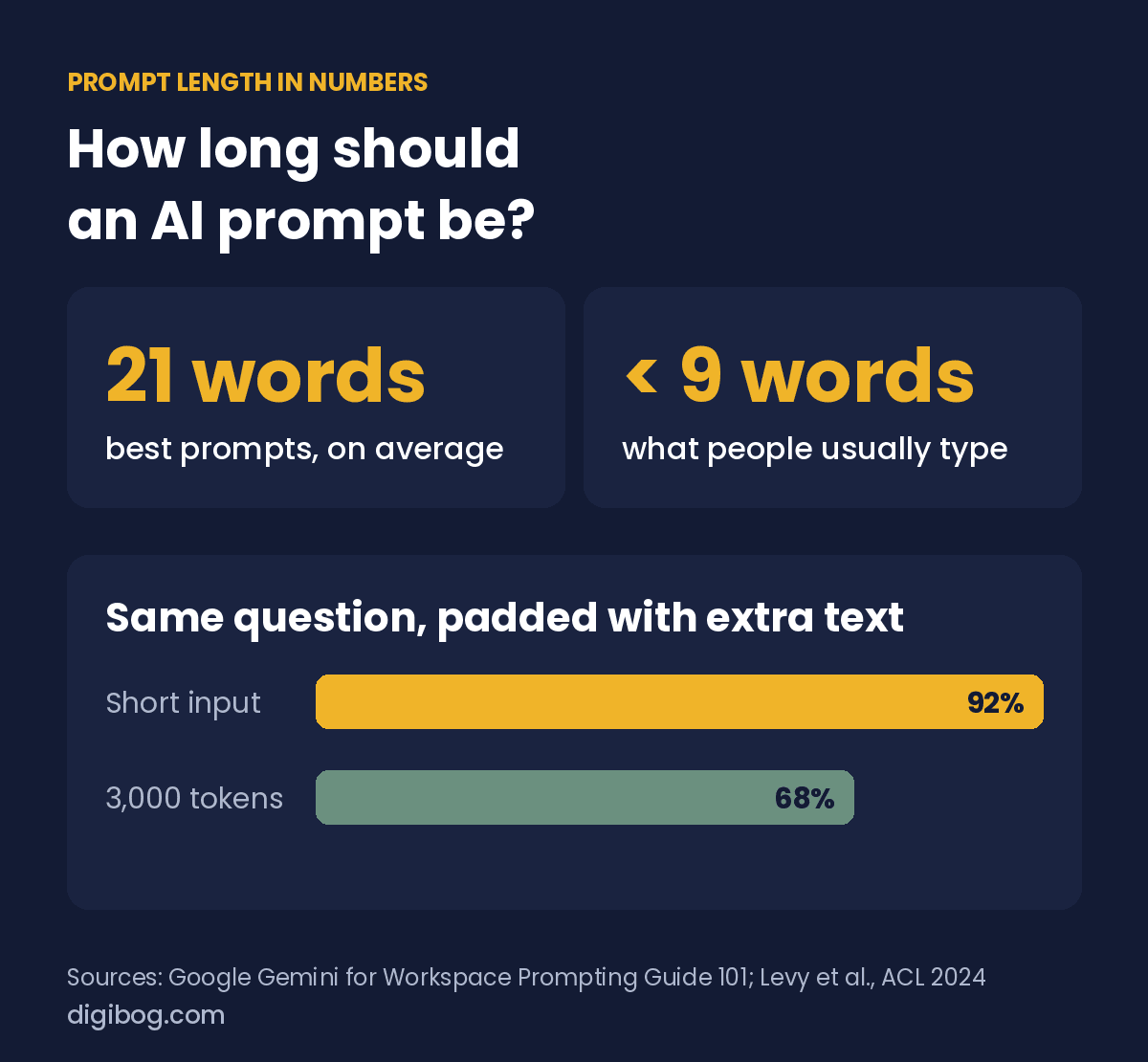
When Google studied how people used Gemini inside Workspace, it found that the prompts that worked best averaged about 21 words. The prompts people actually typed when nobody had told them this were usually under nine words. In other words, most people give the model less than half of what it needs. The figure is published in Google’s own Gemini for Workspace Prompting Guide 101.
So the common mistake is not writing too much. It is writing a search query, like “email to client about delay”, and expecting a finished email back.
✍️ So how many sentences is a good prompt?
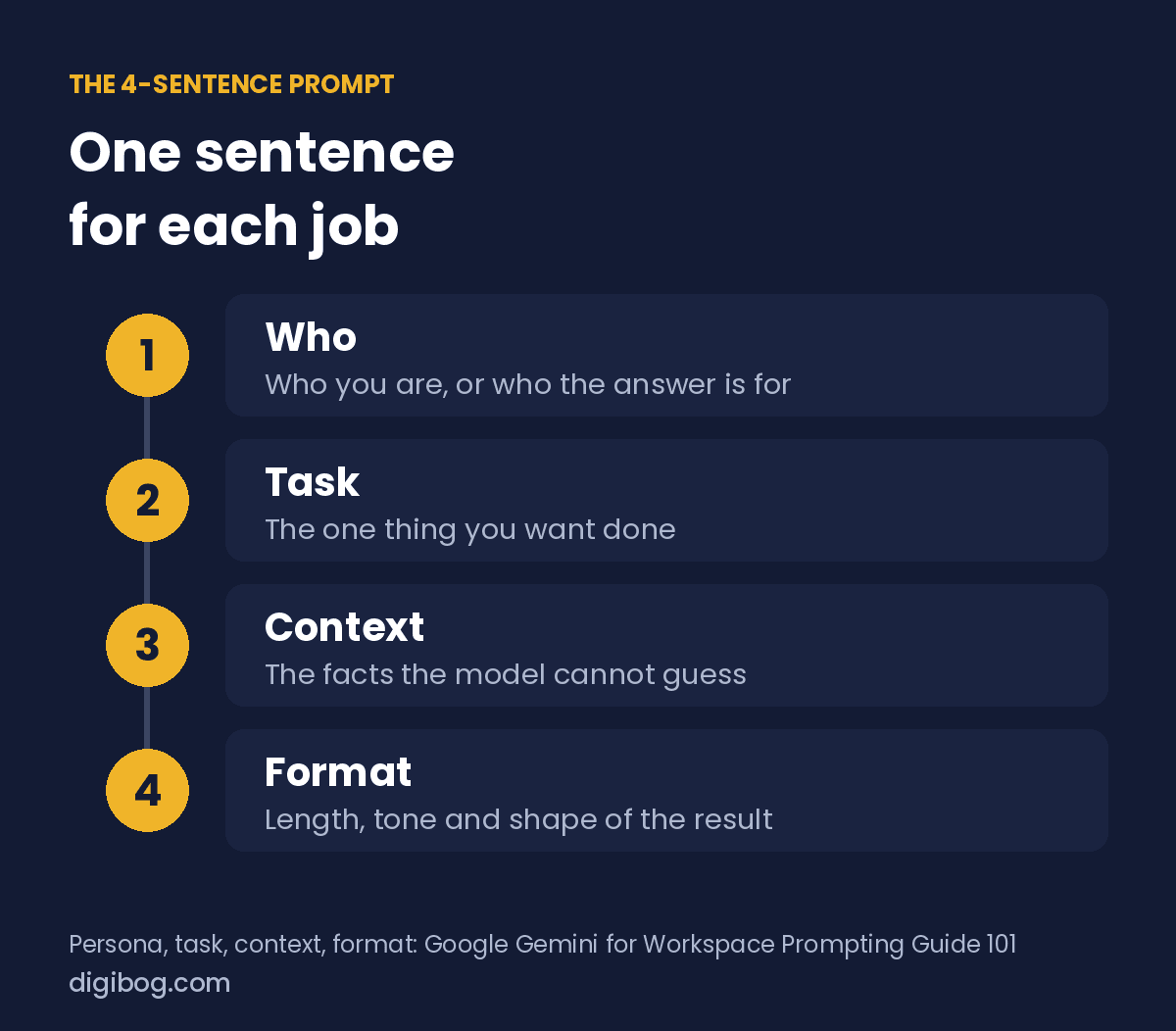
Twenty-one words is about two ordinary sentences. In practice, a prompt that works well has four jobs to do, and each job fits in one sentence. Google’s guide names the same four ingredients: persona, task, context and format.
| Sentence | Its job | Example |
|---|---|---|
| 1. Who | Who you are, or who the answer is for | “I run a small online shop selling printable planners.” |
| 2. Task | The one thing you want done | “Write a reply to a customer whose download link expired.” |
| 3. Context | The facts the model cannot guess | “She bought it 40 days ago and the link only lasts 30; I am happy to send a new one.” |
| 4. Format | Length, tone and shape of the result | “Keep it under 80 words, warm but not gushing, no subject line.” |
That prompt is four sentences and about 60 words. Every sentence removes a guess the model would otherwise have to make. Drop sentence three and you get a polite reply that asks the customer for details you already have. Drop sentence four and you get 250 words with three apologies in them.
⚖️ When shorter is fine, and when you need more
The four-sentence shape is a default, not a law. Use it as the middle setting and move away from it on purpose:
- 🟢 One sentence is enough for lookups and simple rewrites: “Translate this into French”, “Give me five synonyms for calm”. The task carries its own context.
- 🟡 Three to five sentences for most work: emails, product descriptions, outlines, summaries for a specific reader.
- 🟠 A paragraph or two plus examples when the output has a house style or an exact format, such as JSON with fixed keys or a caption in your brand voice. Here examples do more than extra description. Our guide on how many examples a prompt needs covers the count.
- 🔴 Long prompts with documents attached for analysis of reports, contracts or data. These are long by necessity, and they need the placement rule in the next section.
Examples are where length genuinely pays. In Google’s chain-of-thought paper, giving a large model eight worked examples that showed their reasoning took it from about 18% to about 57% on a benchmark of grade-school maths word problems (Wei et al., 2022). The prompt got much longer, and the answers got much better, because every added line was useful.
📉 When a longer prompt makes answers worse
The trouble starts when length comes from padding rather than from information. A 2024 study presented at ACL took the same reasoning questions and simply surrounded them with extra text that did not change the answer. Average accuracy across the models tested fell from 0.92 on short inputs to 0.68 at around 3,000 tokens, a little over 2,000 words, which is far below what those models can technically accept (Levy, Jacoby and Goldberg, 2024).
Same task, same answer, more words around it, worse results. Pasting your whole conversation history, three versions of the brief and a long backstory “just in case” is not free. Each extra paragraph is something the model has to read past.
There is a money side too. Most AI tools that charge by usage charge per token, so a padded prompt costs more every time it runs. We go through that in your prompt has a bill.
📍 Where you put things matters as much as how much
A Stanford-led study tested what happens when the one useful document sits among 19 that are not useful, and only its position changes. With GPT-3.5-Turbo, accuracy was 75.8% when the useful document came first, 63.2% when it came last, and 53.8% when it sat in the middle. That middle score is lower than the 56.1% the same model got with no documents at all (Liu et al., Lost in the Middle).
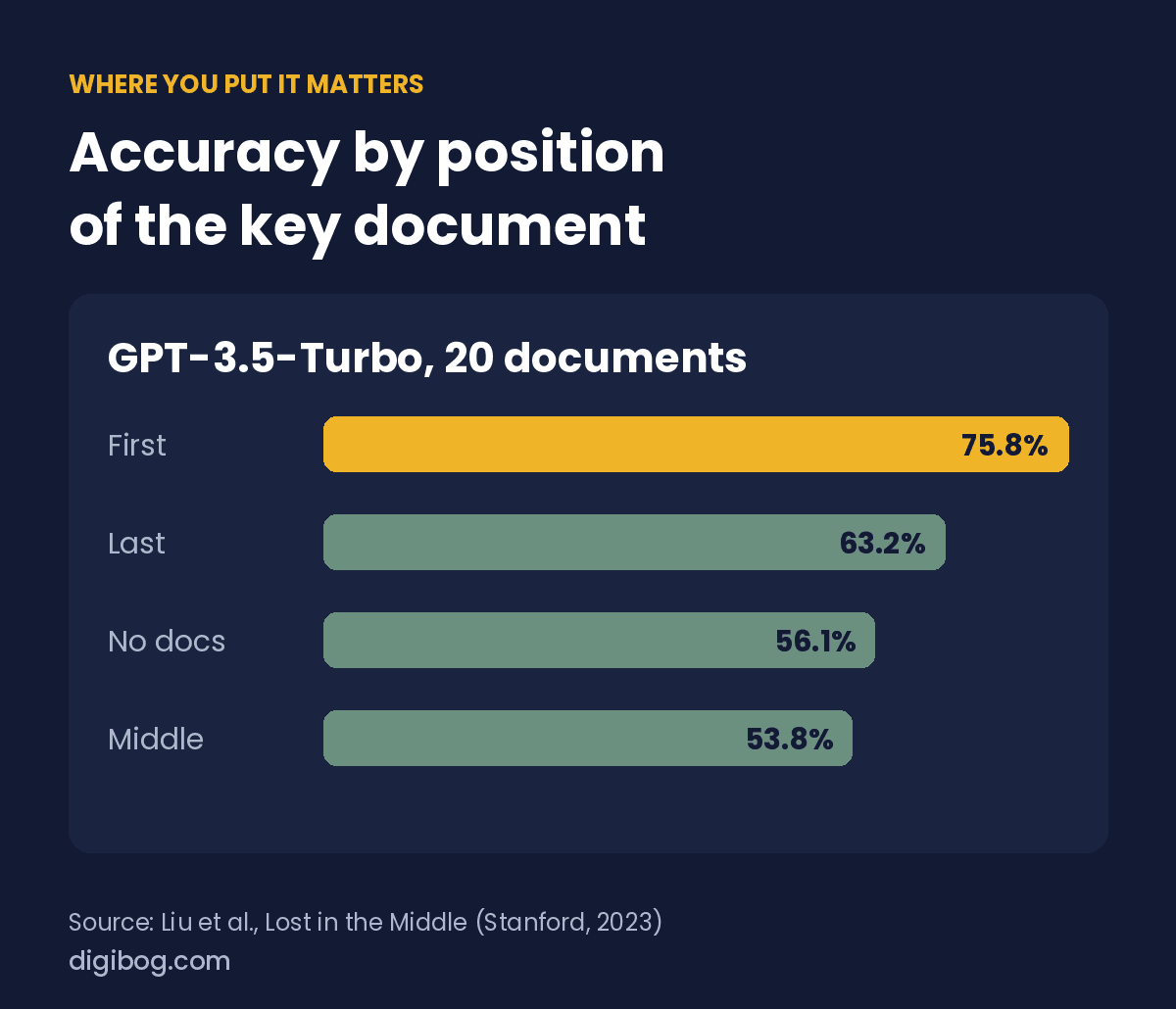
Newer models handle long inputs better than the 2023 models in that study, so treat the exact numbers as a warning sign rather than a forecast. The habit it teaches still costs nothing:
- 📌 Put the instruction at the start, and repeat the key ask at the end if the prompt is long.
- 📌 Put the most important fact near the top, not in paragraph seven.
- 📌 Cut documents down to the part that matters before you paste them.
The same study found that going from 20 to 50 retrieved documents improved GPT-3.5-Turbo by only about 1.5%. More material is not the same as more help.
🛠️ Five quick fixes for a prompt that feels too short or too long
- ✅ Count the guesses. Read your prompt as a stranger. Every question they would need to ask is a missing sentence.
- ✅ One task per prompt. If your prompt contains “and also”, split it. Two short prompts beat one crowded one.
- ✅ Say the format out loud. Word count, bullet points or not, tone. This single sentence fixes most “too long, too generic” answers.
- ✅ Cut the backstory. Keep facts that change the answer. Delete history that only explains how you got here.
- ✅ Test it twice. Run the same prompt two or three times. If the answers wander, the prompt is underspecified. Our guide on testing a prompt before real users see it shows a simple routine.
❓ Frequently asked questions
How many words should a ChatGPT or Gemini prompt be?
For everyday tasks, aim for about 20 to 60 words. Google found its most successful Gemini prompts averaged around 21 words, while most people typed fewer than nine. Go longer when you add examples or documents the model genuinely needs.
How many sentences are in a good prompt?
Usually three to five: one for who it is for, one for the task, one or two for the context the model cannot guess, and one for the format of the answer. Simple lookups can be a single sentence.
Can a prompt be too long?
Yes. Research from 2024 found that adding irrelevant text around the same question lowered average accuracy from 0.92 to 0.68 at around 3,000 tokens. Long is fine when every part is useful; padding is what hurts.
Where should the instruction go in a long prompt?
At the start, with the key request repeated at the end. Studies of long inputs show models use information at the beginning and end more reliably than information in the middle.
🎯 The rule to keep
Do not aim for a word count. Aim for zero guesses. Write the four sentences (who, task, context, format), add examples only when the format is strict, and cut anything that does not change the answer. For most tasks that lands you right around the 21 words Google measured, and well short of the length where answers start to slip.
If you want this as a routine rather than a rule of thumb, the AI Prompt Engineering Checklist turns it into a one-page check you run before you hit send, and the AI Prompt Engineering Guide walks through building prompts for real business tasks. Both are part of the AI Prompt Engineering Complete Bundle.
For more practical resources, browse the AI Prompt Engineering collection. Next, see where system prompts and user prompts belong.
About the author. Written by Said Sihame, founder of DigiBog. I make the planners, workbooks and checklists sold on this site, and these articles come out of the same work. Everything here is what I use and test myself — take what fits and leave the rest.