Every few months a new app promises to fix your focus. You download it, set it up with genuine enthusiasm, use it beautifully for nine days, and then never open it again. Meanwhile the previous four apps are still installed, quietly sending notifications. This is how to choose ADHD productivity tools you will still be using in three months.
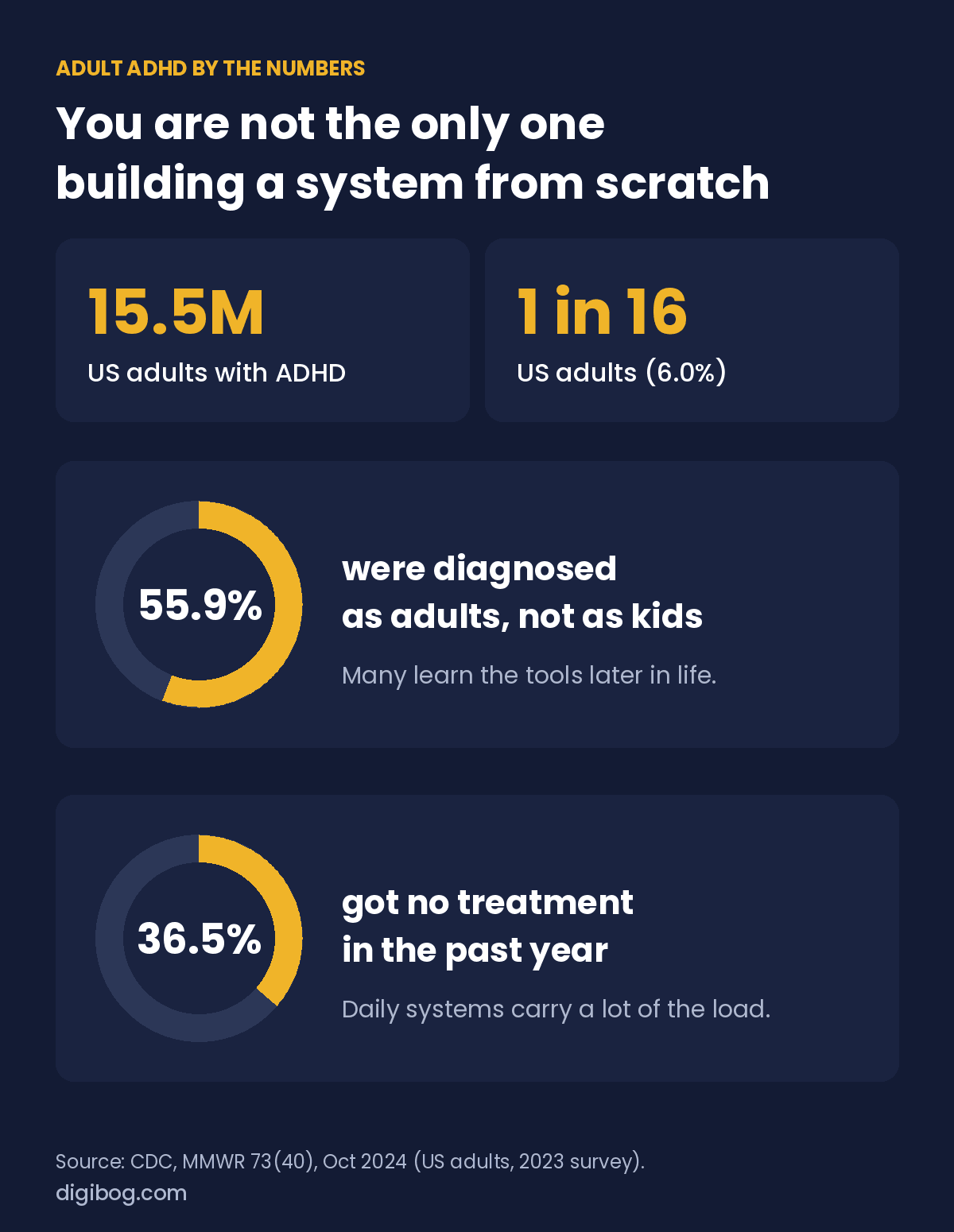
If that pattern sounds familiar, you have plenty of company. The CDC estimates that 15.5 million US adults, about 1 in 16, currently have an ADHD diagnosis. More than half of them (55.9%) were diagnosed as adults, and 36.5% had no treatment at all in the past year. A great many adults are building their systems from scratch, often late, with everyday tools carrying a lot of the load. No app is a treatment, but the right one can remove a specific piece of friction.

The problem is rarely the app. It is that most ADHD tool advice hands you a list of thirty options and no way to choose between them. So you install several, split your attention across all of them, and end up with more overhead than you started with.
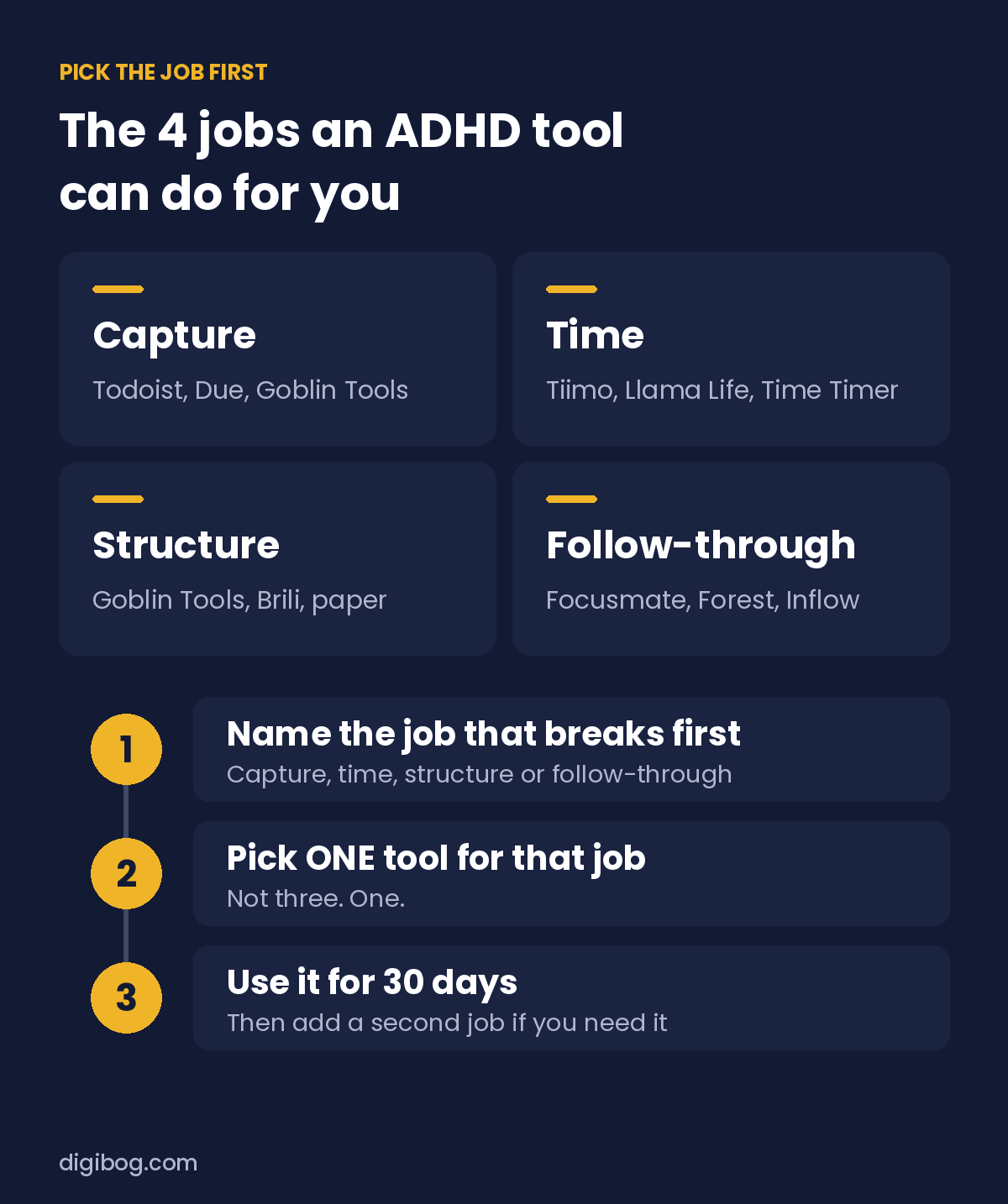
Here is a different approach: understand the four jobs a tool can do, pick one tool for the one job that is hurting most, and ignore everything else for a month. Below you will find the four jobs first, then fourteen named tools sorted into them, then a table you can scan in ten seconds.
The four jobs ADHD productivity tools do, and what matters in each
Capture — giving thoughts somewhere to land
If ideas and tasks are bouncing around your head, you are using working memory as storage, and it leaks. A capture tool catches things the moment they appear.
What matters: speed above everything. If capturing a thought takes more than three seconds or more than two taps, you will not do it when it counts. A beautiful app with a five-step entry flow is worse than a plain notes widget on your home screen.
Time — making hours visible
This is the one most people skip and most people need. If time is abstract in your head, no task app will save you.
What matters: visibility, not alarms. A countdown you can see shrinking gives continuous feedback. A timer that only beeps at the end tells you it is over, which is too late to be useful.
Structure — breaking work into steps
A tool that holds projects and lets you break them into next actions, so “launch the product” becomes something you can actually start.
What matters: low setup cost. Powerful project tools reward people who enjoy configuring systems. Configuring a system is itself a wonderful way to avoid work. Choose something you can set up in fifteen minutes.
Follow-through — keeping something going
Habit and streak tools that provide external accountability across days.
What matters: how it handles a broken streak. Some apps reset you to zero, which for many ADHD users triggers abandonment. A tool that treats a missed day as a missed day, not a failure, survives longer.
Best ADHD productivity apps by need
If you came here looking for the best productivity app for ADHD, the honest answer is: the best one is the one that fixes the job that breaks first for you. This table maps the most common needs to one tool each. The same tools work for adults who still call it ADD.
| Your need | Try first | Why it helps |
|---|---|---|
| Thoughts and tasks everywhere | Todoist | One fast place to capture everything |
| Big task, no idea where to start | Goblin Tools (Magic ToDo) | Breaks a task into small steps for you |
| Time disappears (ADHD time management) | Tiimo or a physical Time Timer | Makes time visible instead of abstract |
| Cannot start alone | Focusmate | Live video co-working with another person (body doubling) |
| Starts strong, drifts after 10 minutes | Forest | A short focus timer with a visible reward |
| Routines fall apart | Brili | Turns a routine into a timed sequence |
The 14 ADHD productivity tools worth knowing in 2026
Search for ADHD productivity tools and you get forty apps in a row with no way to choose between them. Here are the names that keep coming up, each one labelled with the job it does, what it is genuinely good at, and the honest reason people drop it. We sell none of them and there are no affiliate links anywhere on this page.
1. Goblin Tools (Magic ToDo) — best for capture and structure
You paste in something shapeless like “clean the kitchen” or “sort out the tax thing” and it breaks it into steps, with a slider for how much hand-holding you want. It exists for the exact moment where a task is too vague to start, which is where most ADHD paralysis actually happens — not in the doing, in the deciding what doing looks like.
Good at: turning a fog into a first step. Watch for: it is a helper, not a home. Nothing lives there, so pair it with somewhere the steps can land.
2. Todoist — best for capture
A fast, plain inbox for everything, on every device, with a quick-add box that stays out of your way. If your problem is that tasks evaporate between the thought and the desk, this closes that gap with the least ceremony of anything on the list.
Good at: speed of entry and syncing everywhere. Watch for: it is silent on where the time will come from. A full Todoist and an empty calendar is a very common ADHD trap — the list grows, the day does not.
3. Due — best for reminders that refuse to be ignored
Most reminder apps notify you once, you swipe it away while your hands are full, and the task is gone forever. Due keeps coming back at an interval you set until you actually mark the thing done. It is mildly annoying by design, and that is the entire point.
Good at: the handful of things that genuinely cannot be missed — medication, a call, a deadline. Watch for: put ten things in it and you will start swiping reflexively. Keep it to the few that matter.
4. Remember the Milk — best for a no-learning-curve list
One of the oldest task apps still standing, which is itself a recommendation. It syncs everywhere, it does not reinvent itself every year, and you can be using it properly in five minutes without watching a tutorial.
Good at: being boring and reliable. Watch for: it will not motivate you. It is a container, not a coach.
5. Tiimo — best for making the day visible
Tiimo turns a list into a visual timeline of your day, with blocks you can see filling and emptying. It was designed with neurodivergent users in mind rather than adapted for them afterwards, and it shows in how much it leans on icons, colour and visible duration instead of text.
Good at: the “where did the afternoon go” problem — the closest an app gets to letting you watch time pass. Watch for: planning the day inside it can itself become the day. Set a limit on how long you spend arranging blocks.
6. Llama Life — best for one task at a time
You put a task in, give it a length, and it runs a timer. Then the next one. It refuses to show you the whole mountain and only ever shows you the next step with a clock on it, which is exactly the right amount of information when everything feels like too much.
Good at: getting started on days when the list is paralysing. Watch for: your time estimates will be wrong for weeks. That is not failure, that is the data — the estimates are the thing you are training.
7. A physical Time Timer — best for time, with no screen involved
A clock face where a coloured disc shrinks as the minutes pass. No screen, no notifications, no app to open, nothing to update, and no way for it to become a browsing session. You glance at it and you can see, without reading anything, how much is left.
Good at: being the one tool that cannot distract you. It is often the cheapest thing on a list like this and often the one still in use a year later. Watch for: it only works where you can see it. One per room you actually work in.
8. Brili — best for turning a routine into a sequence
Routines presented as an ordered sequence with a clock running against each step, so a morning is not one enormous undifferentiated block but nine small ones you can be inside. It is marketed largely at families, and it is used by a great many adults who do not mention it at parties.
Good at: the repeating parts of the day that quietly go wrong — mornings, evenings, leaving the house. Watch for: it needs a setup session before it earns anything. Do that once, on a good day.
9. Paper — best for structure with nothing to maintain
A printed page cannot notify you, update itself, ask for a subscription, or offer you a settings screen at the exact moment you were about to start. It is also the only tool here you can leave open on the desk, and that visible open page is the cue that makes the rest of the system work.
Good at: surviving a bad week at ten percent effort. Watch for: it will not remind you of anything. Most people who last a year end up with paper for the plan and one app for the alarms.
10. Focusmate — best for follow-through with another human
You book a session, a stranger appears on a video call, you both say what you are about to do, and then you work in silence with the camera on. It sounds deeply odd until the first time you sit through fifty minutes of work you had avoided for a week, because leaving is now socially awkward.
Good at: the task you have rescheduled four times. This is body doubling, and for a lot of ADHD adults it outperforms every app on this page. Watch for: it needs booking in advance, which is its own small hurdle.
11. Forest — best for staying off the phone
You plant a tree, it grows while you leave the phone alone, and it dies if you pick the phone up. It is a small piece of theatre and it works better than it has any right to, because it puts something you mildly care about on the other side of the impulse.
Good at: short focus blocks where the phone is the specific enemy. Watch for: once the novelty of the trees fades, so does the effect for some people. That is fine — it did its job for the weeks it worked.
12. Focus Keeper — best for a plain pomodoro timer
Twenty-five minutes of work, five minutes off, repeat, and nothing else attached. No projects, no tags, no dashboard, no reason to open it except to start. The lack of features is the feature.
Good at: people who tried a full productivity suite and drowned in it. Watch for: the standard pomodoro block does not suit everyone. If twenty-five minutes always breaks a good run, change the number rather than abandoning the method.
13. Inflow — best for learning the why behind the pattern
An app built specifically around ADHD, leaning on short structured lessons and exercises rather than being another list. It sits closer to education than to task management.
Good at: the period just after a diagnosis, or any point where the patterns themselves are the confusing part. Watch for: it is a subscription, and reading about ADHD is not the same as changing a Tuesday. Pair it with one practical tool.
14. Numo — best for follow-through that feels like a game
Also built for ADHD, but coming at it from the opposite direction to Inflow: points, streaks, small challenges, community. It is trying to make the boring part sticky rather than to explain it.
Good at: people for whom novelty and reward genuinely do drive behaviour, which is a large share of ADHD adults. Watch for: gamified apps live or die on how they handle a broken streak. Check that before you invest weeks in one.
The 14 tools at a glance
| Tool | Job it does | Pick it when |
|---|---|---|
| Goblin Tools | Capture + Structure | The task is too vague to start |
| Todoist | Capture | Tasks evaporate before you write them down |
| Due | Capture | A few things absolutely cannot be missed |
| Remember the Milk | Capture | You want a list with no learning curve |
| Tiimo | Time | The day disappears without you noticing |
| Llama Life | Time | The list is too big to start anywhere |
| Time Timer (physical) | Time | Every screen becomes a distraction |
| Brili | Structure | Mornings and evenings keep going wrong |
| Paper | Structure | You have abandoned four apps already |
| Focusmate | Follow-through | One task has been rescheduled four times |
| Forest | Follow-through | The phone is the specific problem |
| Focus Keeper | Follow-through | You want a timer and nothing else |
| Inflow | Follow-through, by understanding the pattern | The patterns themselves are confusing |
| Numo | Follow-through | Points and streaks actually move you |
One rule before you install anything: name the job you are failing at this month, then take one tool for that job. Four apps is four things to maintain, and maintenance is the thing an ADHD brain quietly stops doing.
How to actually choose
Ask one question: which of the four jobs is costing me most this month?
If tasks vanish from your mind, that is capture. If you keep running late and misjudging, that is time. If projects stall before starting, that is structure. If you start things well and lose them by week two, that is follow-through.
Pick that one. Choose one tool for it. Use it for thirty days before adding anything.
If two jobs feel equally broken, take the time one first. Capture, structure and follow-through all quietly assume you have a realistic sense of how long things take, and when that sense is missing, the other three tools inherit the problem. Making time visible is the repair that makes the rest of them work.
Five rules that matter more than which app you pick
- One tool per job. Two capture apps means capturing nothing reliably, because you never know which one has it.
- Free until proven. Do not pay until a tool has survived a month. Paying for an unused subscription adds guilt to an already loaded system.
- Fewer features wins. Every feature is a decision, and decisions cost attention. The tool you still use in March beats the powerful one you abandoned in January.
- Turn off notifications you did not deliberately choose. A focus app that interrupts you is a contradiction.
- Set a review date. Put a reminder thirty days out that simply asks: am I still using this, and is it helping? If not, uninstall without ceremony.
Why the tool stack keeps growing
Setting up a new productivity system feels like progress. It gives you a hit of novelty, a sense of a fresh start, and the pleasant illusion of getting organized without doing any of the actual work.
That is worth naming honestly, because recognizing the pattern is what breaks it. If you have set up three systems in six months and finished nothing, the systems are not the problem. Adding a fourth will not help.
The uncomfortable move is to keep a mediocre tool you already use rather than switch to a better one you will have to learn. Consistency beats optimization almost every time.
If you want a shortlist instead of a search
Comparing tools is itself a task that can eat a weekend and produce nothing. Our Productivity with ADHD Toolstack reviews 24 tools organized by the support you need, with space to record what you tested, what you kept, and why. It is built to end the search rather than extend it.
If your difficulty is less about tools and more about the underlying patterns, our Productivity with ADHD Guide works through the strategies first, which is usually the better starting point.
Struggling to keep any tool going past week two? That is usually a habit problem, not a tool problem — see why streaks fail with ADHD. If the trouble is that hours disappear without warning, start with ADHD time blindness, and if your list itself keeps collapsing, read why your to-do list keeps failing you. For the wider picture behind all four jobs above, executive function and the five areas that shape your day is the one to read next.
If the tool you reach for is an AI assistant, the Productivity with ADHD prompt pack gives you ready-made prompts for planning a day, breaking down a task you are stuck on, and restarting after a lost week.
The honest summary
No tool fixes ADHD. A good one removes a specific piece of friction, and that is genuinely worth having. Pick the one job hurting most, choose one tool, give it thirty days, and resist the pull of the next shiny thing until then.
One tool used consistently will do more for you this year than twelve tried enthusiastically and dropped.
You can browse the full Productivity with ADHD collection — book, workbook, guide, prompts, toolstack and checklist — or take all six together in the Complete Bundle.
Questions people ask
What is the best ADHD productivity tool?
There is no single best one, and the lists that claim otherwise are ranking by affiliate rate. The best tool is the one that covers the job you actually fail at, and that you can open in under five seconds.
Are ADHD apps better than paper?
Apps are better at reminding you. Paper is better at not distracting you. Most people who make it past a month end up with both: paper for the plan, one app for the alarms.
Why do I abandon every app after two weeks?
Because the novelty was doing the work, not the system. When the newness wears off, anything that needs daily maintenance stops. Pick the tool that survives a bad week at ten percent effort.
Do I need to pay for an ADHD app?
No. Start with the free tier or with paper, and only pay once a tool has survived a month of ordinary life. Paying earlier buys motivation, and motivation is the part that was never the problem.
Related reading: if your main struggle is the workday itself, see ADHD at work: 10 office tools and simple habits.
About the author. Written by Said Sihame, founder of DigiBog. I build the planners, workbooks and checklists in the Productivity with ADHD collection, and I test every tool named on this page against the same question I ask of our own products: is it still open in week five? I am not a clinician, and nothing here is medical advice — this is an educational and organizational resource. Tool names are given for reference only; DigiBog has no affiliate arrangement with any of them.